Supply
Why Your Numbers Don't Match the Exchange's
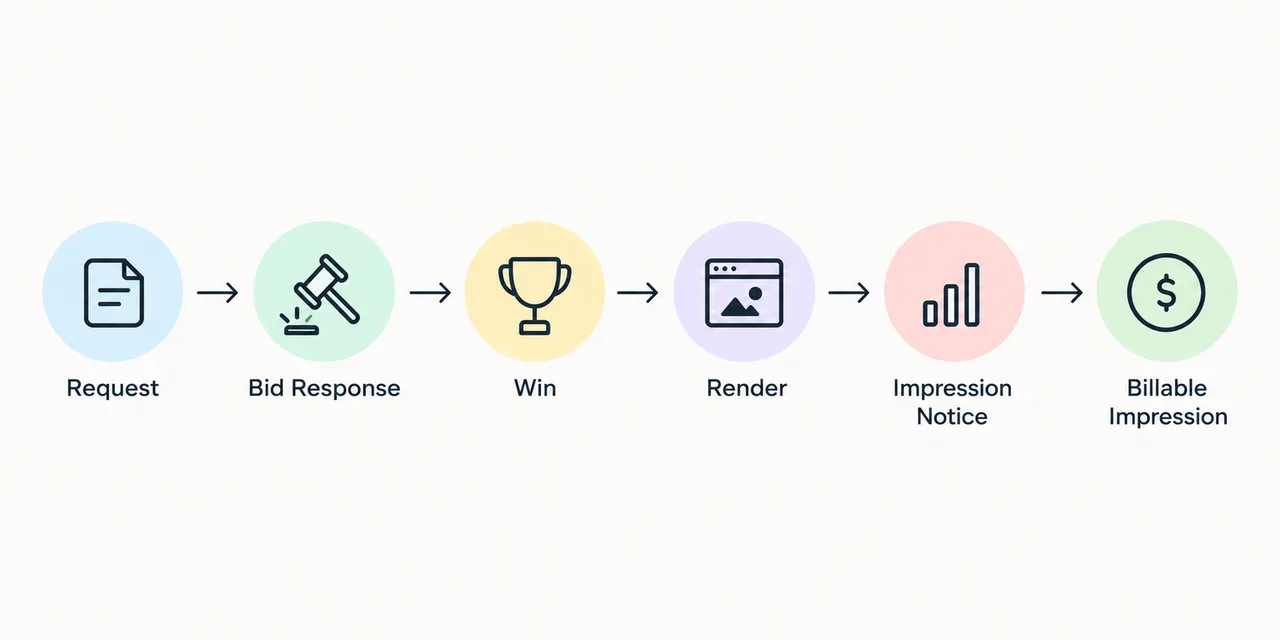
Your impression count and the exchange report rarely match perfectly. Learn where numbers diverge, how Adon3 reconciles impressions and when a discrepancy needs investigation
Most publishers know pop-unders pay well. Fewer know what happens in the 200 milliseconds between the click and the loaded landing page, or which single setting decides whether your traffic clears at the top or the bottom of the range.
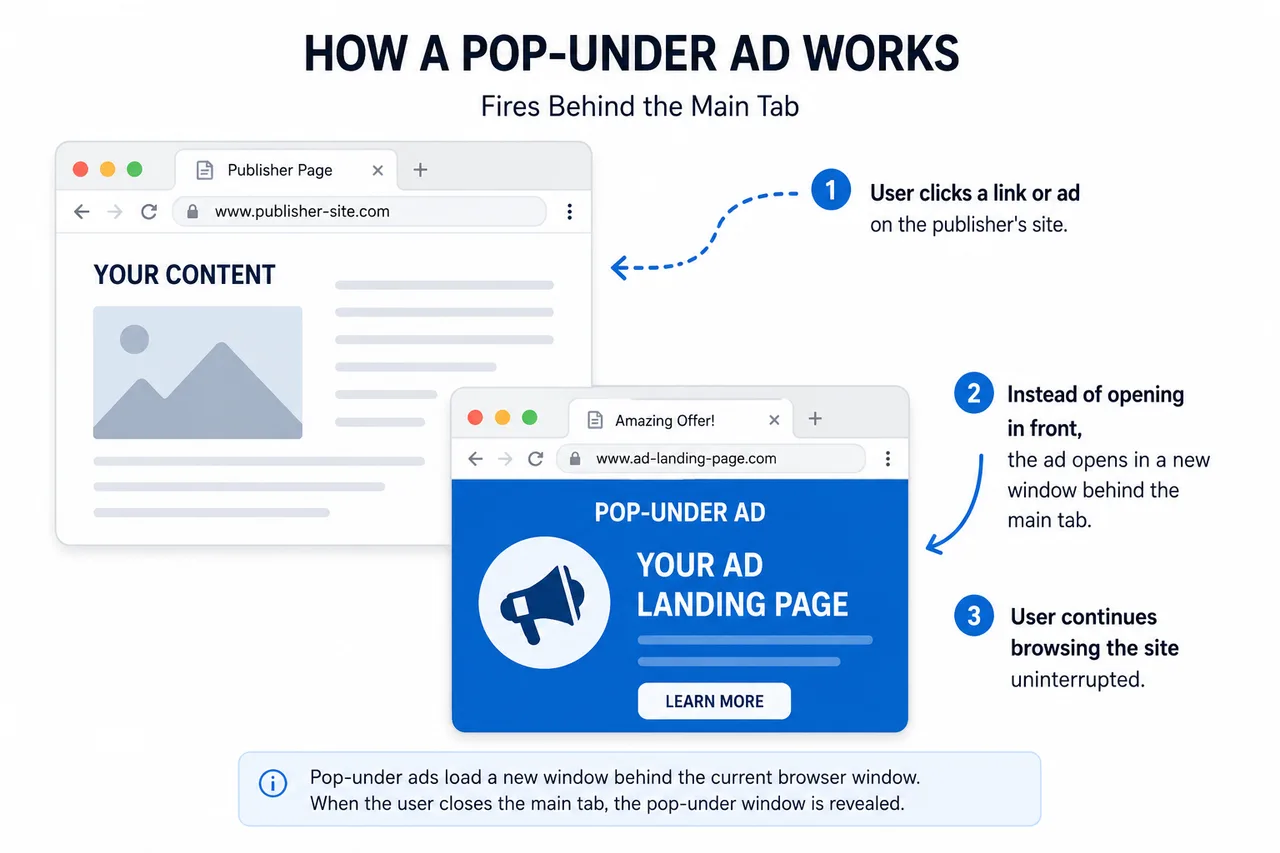
A pop-under ad is a full page advertisement that opens in a new browser window or tab behind the page a visitor is already reading. The visitor keeps browsing your site without interruption and sees the advertiser's page only after they close or minimise the original window. For publishers, it is one of the highest paying ad formats per impression, because the advertiser gets an entire screen instead of a banner slot.
That is the short answer. The longer answer, which is the one that actually affects your revenue, is about what happens in the 200 milliseconds between the click and the loaded landing page, and about which settings decide whether your eCPM lands at $0.40 or $4.00.
People use the two terms as if they are the same format. They are not, and search engines, browsers, and advertisers all treat them differently.
A pop-up opens in front of the content. The visitor has to deal with it before continuing. It interrupts, it annoys, and modern browsers block most of them aggressively.
A pop-under opens behind the content. Nothing is covering the article, the video, or the download button. The visitor finishes what they came for, closes the tab, and then encounters the advertiser.
That single difference in stacking order changes everything downstream. Pop-under traffic has better session times on the publisher side because nobody bounces in frustration. It also has better conversion rates on the advertiser side, because the person seeing the offer is no longer mid task and mentally blocked. Advertisers know this, which is why pop-under inventory clears at higher prices than pop-up inventory in most GEOs.
Here is the sequence, step by step.
1. The script loads. You place a small JavaScript tag in your page, usually before the closing body tag. It sits idle and waits.
2. The visitor performs a gesture. Chrome, Firefox, Safari, and Edge all require a genuine user interaction before a script is allowed to open a new window. A click, a tap, or in some implementations a scroll plus click combination. Without that gesture the browser blocks the window and you earn nothing. This is why pop-under scripts fire on click rather than on page load.
3. A new window opens and is pushed behind. The script calls window.open(), then immediately returns focus to the original window. On desktop this creates the classic under window. On mobile, where windows behave differently, most networks use a tab-under approach where the new tab opens and the original is refocused.
4. The bid request goes out. The new window hits the ad exchange endpoint carrying the details of the impression: your zone ID, the visitor's country and city, device type, operating system, browser and version, connection type, referrer, and whether this user has been seen recently.
5. Advertisers bid. Multiple demand sources evaluate the request against their targeting rules and return a price. On an RTB exchange this happens in real time, typically inside 100 milliseconds. The highest valid bid wins.
6. The redirect chain resolves. The winning advertiser's URL is returned, the browser follows the redirects, and the landing page renders in the background window.
7. The impression is logged and your revenue is recorded. If you are on a CPC model, a click event is fired and counted at that point instead.
The entire chain finishes before your visitor has scrolled two paragraphs. If any link in the chain is slow, especially a long redirect chain on the advertiser side, the landing page may not render fully and the impression can go unpaid.
Publishers often assume traffic volume is the main driver of income. It is not. Composition matters far more than volume. These are the factors, roughly in order of impact.
GEO. This is the single largest variable. The same script on the same site earns very different amounts depending on where visitors are located. Tier 1 markets like the United States, United Kingdom, Canada, Australia, and Germany carry the strongest demand. Tier 2 covers most of Europe and parts of Latin America and Asia. Tier 3 includes large volume markets such as India, Indonesia, Pakistan, and Nigeria where rates are lower but volume is high and consistent.
Device and OS. Mobile and desktop are priced separately because the offers running on them are different. Android traffic tends to attract utility, cleaner, and app install offers. iOS traffic attracts higher value sweepstakes and subscription offers, often at a premium. Desktop still commands strong rates in Tier 1 for software, finance, and dating verticals.
User freshness. A visitor seeing a pop-under for the first time today is worth considerably more than the same visitor on their fifth impression. Advertisers pay for reach, not repetition.
Time and day. Demand budgets are not spread evenly. Weekday evenings in the target GEO usually clear higher than weekday mornings, and the last week of a month can soften as advertiser budgets run dry.
Traffic source. Organic search and direct traffic price well. Traffic arriving from other pop networks, incentivised sources, or bot heavy proxies gets discounted or blocked outright.
Knowing the buyers helps you understand your own reports. The consistent spenders on pop and pop-under inventory are:
Sweepstakes and prize draws, especially on mobile in Tier 1 and Tier 2
Utilities, VPNs, antivirus, and system cleaners
Finance offers, including trading platforms and loan comparison
Dating and social discovery
iGaming and betting, where local regulation allows it
App installs and subscription services
Streaming and content aggregators
If your site attracts a specific audience, tech tutorials, sports scores, file downloads, or video streaming, you will usually see one or two of these verticals dominate your revenue and the rest barely register.
If you take one operational point from this guide, take this one.
Frequency capping limits how many pop-unders a single visitor can trigger inside a time window. The standard setting is one impression per user per 24 hours. Some publishers set it to one per 12 hours or one per 6 hours to squeeze out more impressions.
That extra volume is almost always a false economy. Advertisers track post click behaviour, and repeat impressions from the same user convert poorly. When their conversion rate on your zone drops, they lower their bids for your zone or stop bidding entirely. You end up serving three times the impressions for less total revenue, and your traffic quality score takes a hit that can take weeks to recover.
Start at one per 24 hours. Test cautiously from there and watch your eCPM, not just your impression count.
There are three common integration routes, and the right one depends on your scale.
JavaScript tag. The simplest option. You register, create a zone, copy a script, and paste it into your template. Good for a single site or a small network of sites. You get reporting through the network dashboard.
Direct link. No script on your site at all. You get a URL that routes through the exchange and lands on the highest bidding offer. Useful for monetising social traffic, messaging apps, link shorteners, and any placement where you cannot inject JavaScript.
XML or RTB feed. For publishers running meaningful daily volume or operating their own ad server. You send bid requests directly and receive bid responses, which gives you control over floors, blocking, and mediation between multiple demand partners. This is the route most established publishers move to once they outgrow tags.
Whichever route you pick, publish your ads.txt file and keep it accurate. Buyers increasingly filter unauthorised inventory, and a missing or stale entry quietly caps how much demand can reach you.
A few practical constraints worth knowing before you launch.
Browsers block window opens that are not tied to a user gesture, so any implementation promising pop-unders on page load without interaction is either outdated or doing something that will get flagged. Ad blockers catch a share of pop-under scripts, and the loss rate varies by audience, with tech literate visitors blocking at much higher rates than general consumer audiences.
If you serve visitors in the EU or UK, consent obligations under GDPR apply to the data flowing in the bid request. Your consent management platform needs to gate the script, not just the analytics.
Finally, some ad networks and search engines take a dim view of certain placements. Never run pop-unders on pages carrying Google AdSense, and check the policy of any other network on your site. Mixing incompatible demand is the fastest way to lose an account.
Running with no frequency cap and wondering why the eCPM keeps falling
Placing the trigger on a critical element such as a download or play button, which frustrates users and inflates accidental impressions
Never checking which GEOs are actually earning, and treating all traffic as one pool
Ignoring redirect chain speed, which silently kills a share of impressions before they register
Sending purchased or incentivised traffic through a zone and getting the zone blocked by every buyer at once
Leaving ads.txt unupdated after adding a new partner
Are pop-under ads still effective in 2026? Yes. Demand for pop and pop-under inventory has stayed steady because the format delivers full page attention at a low cost per impression, which suits performance advertisers running direct response campaigns.
Do pop-under ads hurt SEO? Pop-unders do not sit in the rendered page, so they do not directly affect crawling or indexing. They can affect user signals if implemented badly, for example by firing on every click. A reasonable frequency cap and a sensible trigger keep the impact minimal.
How much can a publisher earn from pop-under ads? It depends almost entirely on GEO mix, device split, and traffic quality. Rates vary widely between Tier 1 and Tier 3 inventory, so the honest answer is to run a test with your own traffic for a week and read the report rather than trust a headline number.
Can I run pop-under alongside other ad formats? Yes, and most publishers do. Pop-under pairs well with push notifications and display banners because it monetises a different moment in the session. Check the policies of each network before combining them.
What is the difference between pop-under and tab-under? A pop-under opens a new browser window behind the current one. A tab-under opens a new tab and returns focus to the original tab. The tab-under approach is standard on mobile, where separate windows are not practical.
If you are evaluating pop-under monetisation, the fastest way to get a real answer is to run your own traffic against live demand for a few days and read the numbers by GEO and device rather than looking at the blended average.
Adon3 connects publishers to CPC demand for pop and push inventory through tag, direct link, and XML integration, with Net 30 payment terms. If you want to see what your traffic clears at, create a publisher account and set up your first zone in a few minutes.
Your impression count and the exchange report rarely match perfectly. Learn where numbers diverge, how Adon3 reconciles impressions and when a discrepancy needs investigation
Google AdSense can work with some gambling websites, but restrictions apply. Learn the rules and alternative ways to monetize gambling traffic.
Adult traffic can generate significant revenue when monetized correctly. Learn how to combine ads, affiliate offers and premium content while protecting user experience.